Why Your Book Cover Is Everything

Picture yourself walking through a bookstore. Or scrolling Amazon late at night.
What makes you stop?
It is not the title.
It is not the author.
It is the cover.
That image is not just decoration.
It is your first pitch.
To a reader.
To a publisher.
To the world.
In fact, authors and publishers routinely invest anywhere from $150 to $2,000 for a professionally designed cover, knowing the visual impact can make or break a book’s launch.
The Big Problem: Cost & Barriers
For indie authors and new writers, those price tags are not just numbers.
They are roadblocks.
Paying a designer drains your budget, delays your launch, and can mean endless back-and-forth with no guarantee you will love the result.
But here is the shift:
You do not have to spend big to make your book look professional.
With ChatGPT, you can design a cover that grabs attention, without spending a cent.
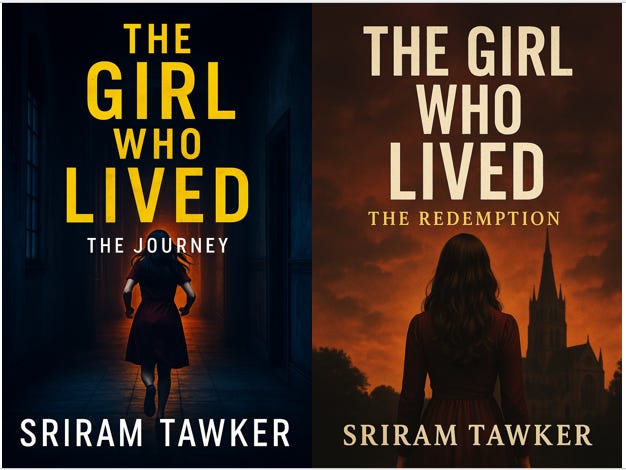
Let me walk you through the process on how I recently created two covers for my thriller series—each one polished, professional, and generated in under two hours.
Step 1: Upload Your Draft Story to ChatGPT
Start with your manuscript.
Or if that feels too early, give ChatGPT a solid synopsis of your book.
The goal is to teach the AI what your book is about—mood, theme, visuals, tone.
This context becomes the foundation for your cover design.
Step 2: Research Genre Book Covers You Love
Go to Amazon, Goodreads, or your favourite genre list.
Save five covers that make you say, “Yes, that’s what mine should feel like.”
Look at the fonts. The colours. The layout.
These are not just pretty images but are market-tested signals.
Upload them into ChatGPT. You are now training the AI to understand your aesthetic and your audience’s expectations.
Step 3: Craft a Precise, Detailed Prompt for ChatGPT
Now bring it all together.
Tell ChatGPT exactly what you want.
Be specific about:
The vibe: “Moody, fast paced thriller set in a coastal city”
The colour palette: “Black, gold, and deep teal”
The visuals: “Stormy sea, a broken compass, distant lighthouse”
The layout: “Bold serif title, minimal subtitle, centred author name”
The more clearly you paint the picture, the closer your first result will land.
Live Example: My Thriller Duology
When working on my own upcoming two part survival thriller series, here is what I did:
Uploaded my draft
Added bestseller covers from the same genre
Used this prompt:
“Act as a professional book cover designer and generate a book cover for the first part of the book in Amazon Cover Size 2,560 pixels in height x 1,600 pixels in width. Research similar international best selling series and design similar cover. The title of the book is “The Girl Who Lived” and subtitle is “The Journey” and author’s name is “Sriram Tawker.”
Within minutes, ChatGPT generated a stunning image.
It looked like a 500 dollar design.
But I paid zero.
Step 4: Iterate Until It Feels Right
You might not get the perfect image the first time. That is normal.
Tweak the prompt.
Swap in different reference covers.
Try alternate compositions.
Play. Adjust. Explore.
This is not just efficient. It is fun.
And most importantly—it is under your control.
Final Words: Own Your Visual Story
Your book cover is more than a file. It is your story’s handshake.
If it feels professional, it builds trust.
If it speaks to your genre, it draws the right readers.
If it looks like it belongs in a bookstore, people will treat it like it does.
With AI, you do not need a big budget or fancy software.
You just need your words, a few images, and a vision worth sharing.
So take the leap.
You are one good prompt away from a book cover that sells.
Want more support on your self publishing journey?
Read the complete guide to self publishing your book (Traditional approach) 👇
Read the complete guide to self publishing your book using AI tools 👇
🖋️ Enjoyed this post?
All my posts are free to read, and your support helps keep it that way.
If you’d like to support my writing journey, you can check out my book (linked below) or buy me a coffee.
Every bit of encouragement helps keep the stories and insights coming.
Thank you for reading,
Sriram Tawker